Digitzz-Every bit of digital world: web

social icon

Share on Facebook Follow on Twitter Share on Google+ Subscribe to RSS Feed Share on Whatsapp

logo+member+android

Digitzz Andriod App Download Digitzz Andriod App
Showing posts with label web. Show all posts

27 June, 2015

PNR Status - Check Indian Railways Train Ticket Reservation Status Online

Print Friendly Version of this pagePrint Get a PDF version of this webpagePDF

Getting a confirmed ticket is a big battle in itself. Sometimes, while booking a ticket, all available seats exhausted and you left with a wait listed ticket.

Now you can check your wait listed ticket status online. There are multiple websites available which will give you information but this application is slightly different.

26 May, 2015

Live Train Platform Enquiry for Secunderabad, Hyderabad, Kacheguda, Guntakal, Guntur Stations

Print Friendly Version of this pagePrint Get a PDF version of this webpagePDF

If you are going for a train journey then surely after reaching at station entrance you will look for the platform number at notice board for your train which is coming or going to depart from. What if you already know before reaching station that at so and so platform your train will come. i can see smile on your face.

16 March, 2014

Now get SMS alerts on the change of status of your reserved tickets

Print Friendly Version of this pagePrint Get a PDF version of this webpagePDF
Indian Railways added another milestone by launching yet another innovative scheme called the ‘SMS Gateway’, which will enable passengers to get SMS alerts on the status of reserved tickets. The ‘SMS Gateway’ which was developed by Centre for Railway information Systems (CRIS), an autonomous organization under the Ministry of Railways, was launched by the Minister of State for Railways Shri Adhir Ranjan Chowdhury here today on the occasion of a seminar on the theme “Role of IT in Rail Services – Present and Future”. The seminar was organised by the Centre for Transportation Research and Management (CTRAM), an autonomous body of the Ministry of Railways. Present on occasion the were Shri Arunendra Kumar, Chairman, Railway Board, Shri D. P. Pande, Member Traffic, Shri Kul Bhushan, Member Electrical and Shri Alok Johri, Member Mechanical, of Railway Board.

19 November, 2012

Single click to add pagination control to your blog

Print Friendly Version of this pagePrint Get a PDF version of this webpagePDF
In this post you will be able to add pagination control to your blogger based blog. it will stylify your blog's traditional "Older/Newer post" pagination control with number based control. learn how.

Steps to follow:

Step#1: Just click the "Add to Blogger" button. it will add whole code to your blog page element section.


Step#2: Now customize the setting as per your need. Go to "Layout" then edit "Pagination by Digitzz" element.

21 October, 2012

Add QR Code to your website for free

Print Friendly Version of this pagePrint Get a PDF version of this webpagePDF
When you visit some good website, you sometime notice that there is a black and white square like this left one. it's a QR code, enhanced version of bar code technology to store more information about the product. it's called Quick response code, readable through QR code reader software. Mostly androids and other smartphone are equipped with this software or you can download from Internet for free.

For example if you focus your blackberry camera in front of this code your BB will read this code and show you the information to be access.

Here i will tell you how you can add this code to your website, web pages or blog to add more information and make your website more mobile friendly.


How to add QR code:
Use the below form to enter your desired information to be encoded. Use setting to get desired result.
Generate QR Code
Enter data to generate QR code

Select size

Select coding

Select error correction level


RESULT
your Qr Code will be generated here


Permalink

QR code to Embed into Website

© Copyrights. All rights reserved to Digitzz and its author Ravindra Gupta

  • In result your QR code image will be generated with download link.
  • Permalink is a permanent link to you QR code image.
  • Last is embed code which you can use to embed this QR code image anywhere in website/blog.

Now if you want to add this form in your blog then you can click below on "Add to blogger" button. your QR code generator form will automatically added to your blog.


For any query, suggestion, feedback feel free to contact or simply scan the blow code to discover more.

08 October, 2012

Convert URL or RSS to Video Clip

Print Friendly Version of this pagePrint Get a PDF version of this webpagePDF


In this post you will be able to convert your URL or RSS feed into video clip.

05 October, 2012

Downloads-Windows Shortcuts guide (PDF) by Digitzz

Print Friendly Version of this pagePrint Get a PDF version of this webpagePDF
Windows Shortcuts PDF Guides by Digitzz
Windows Shortcuts PDF Guides by Digitzz.

A Comprehensive list of Window shortcuts download for free.

Download Instructions:


A $ocial Payment Gateway
The Social Currency
Get content in exchange of social sharing
Please click either the Facebook Like button, the Google +1 button or send a tweet to activate your download link.

01 October, 2012

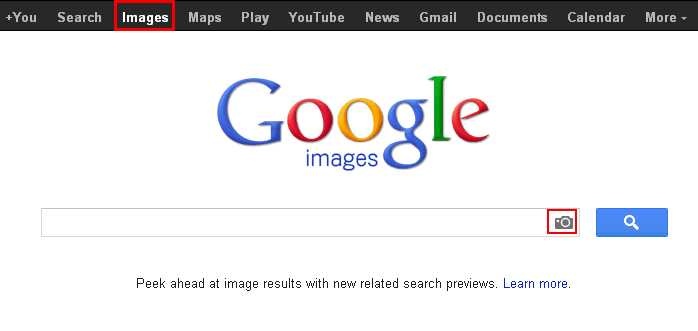
Reverse Image search-Search Content by image

Print Friendly Version of this pagePrint Get a PDF version of this webpagePDF
google image search 


Some times you do not remember people name but you do have their image. By doing reverse image search you can find similar images and associated information with these images over internet.

25 September, 2012

"Add to Blogger" button code generator form for you widget code

Print Friendly Version of this pagePrint Get a PDF version of this webpagePDF
widget
If you want to add or host a widget/gadget on your site/blog and you want that user can add your widget on their website/blog on a click of button. For this you need a widget code generator form.

Use the below form where you can fill in your Widget title, Blog URL, Blog Logo and your HTM/Javascript code of your widget.

After code generation copy that code and paste the generated code in your Blog/Site wherever you want the "Add to Blogger" Button to render.

After clicking the button user will be redirected to Blogger Add Element Page to add the Gadget.This Generator is very useful for the publishers who creates their own gadget for their users.


Form generator for "Add to Blogger" button

"Add to Blogger" button form code generator by Digitzz

Settings


Copyright © 2012 All Rights Reserved to Digitzz and It's Author Ravindra Gupta

23 September, 2012

How to add background sound into your blog/website

Print Friendly Version of this pagePrint Get a PDF version of this webpagePDF

add bg sound


After reading this article you will be able to add background sound in you blog/website.

In this example, background sound will be played once in one day on first page load only.

16 September, 2012

How to become a google verified author in 5 steps

Print Friendly Version of this pagePrint Get a PDF version of this webpagePDF


Whenever you search a topic in Google you always see an author image in left side of SERPs. These author are Google verified author. You can also be a Google verified author. There are lots of benefits associated if you are Google verified author.

Benefits of Google Verified Author:

1. More Visibility of your blog in Search Engine Result Pages.

2. Provides credibility to the Author of the post.

3. Your articles get a unique outlook which attracts users to select your website only.

4. Many Internet Webmasters believes that their blog traffic has been drastically increased after Google Verification process.

5. Gives a personal edge too.

6. It increases your reliability and people are able to recognize you as a branded company.

Here are the steps to become a Google verified author.


Step #1: If you don't have Google+ profile then make a "Google+ profile".


Step#2: Now if you don't have about author page then make a "ABOUT AUTHOR" page on your blog or website.


Step#3: Now anywhere in "ABOUT AUTHOR" page place this link

<a href=”https://plus.google.com/113073129986384123692″ rel=”me”>Join me on Google+</a>
  • Change profile link in blue colour with your Google + profile link.
  • You can also change "Join me on Google +" text with your desired word.
  • Please do not remove rel="me" tag.

Step#4: Now place this following link in header or footer of your blog or website.

<a rel=”author” href=”http://Digitzz.blogspot.com/p/about.html”>About</a>
  • Change author page link in blue colour with your Author page link.
  • Please do not remove rel="author" tag. 

Step#5: Now go to your Google+ profile and click on edit profile. Add a link back to your author page in the “Contributor to” section of your links.

Add a new custom link with a label and URL of your blog/website author page and save it.

Google verified author


Confirm your verification and Picture in Search Engine?

To check your markups and tags properly inserted or not, go to Rich Snippets Testing tool to insure your markup is implemented correctly simply by entering a link to any of your posts in the testing tool. If everything will be OK then your image will be shown.


How much time did Google takes to show your Picture in SERP’s:

Well! It depends on your blog PageRank. If your blog/site have Google PageRank more than 1 then it almost takes 2-3 days.

For blogs having Page Rank 1 or 0 should Ping Google servers to notify this change via this url- 


DONE !


09 September, 2012

How to schedule and publish a post on future date

Print Friendly Version of this pagePrint Get a PDF version of this webpagePDF
How to schedule and publish a post on future date
Most of the people are unaware about the stupendous feature of blog i.e. you can schedule and publish your post on any future date.

Sometimes you don't want to keep your ready post in draft and same time you don't want it to publish, so future posting is a very beneficial idea.

Future posting is very beneficial when you know your audience's visiting time of your blog so that maximum audience can read your post.


Now i will tell you how you can do it.

So here are the steps:

1. Write a new post as usual.

2. Now go to your right hand sidebar "Post setting" and click schedule. 
How to schedule and publish a post on future date


3. Here you will find 2 options, i. Automatic ii. Set date time.


4. Select "Set date and time" option.
How to schedule and publish a post on future date


5. Select desired date and time from calendar. (Also check your time zone according to your location)


6. Press Done.


7. Now press Publish button.

Don't worry your post will not be published because your post has been scheduled and will be publish on scheduled date and time.


You can see a "Scheduled" label is shown against your post it means your post is scheduled and will be published on future date.
How to schedule and publish a post on future date


By doing future posting you can reach targeted audience.

Thanks ! and pl comment.


07 September, 2012

How to encode/decode your facebook, Gmail emails and messages

Print Friendly Version of this pagePrint Get a PDF version of this webpagePDF
1. Add bookmark
Firefox or Google Chrome:
Drag this link:  Digitzz it  to your Bookmarks Bar.
Internet Explorer:
Right click:  Digitzz it  and click "Add to Favorites"
Apple Devices:
Please use iOS version
If you need to decode text from the first version, use this bookmarklet.


2. Encrypt message
Login to Google Mail, Facebook or other site where you want to protect the text.
Type your message and click the bookmark.
Enter the password and click the "Encrypt" button.


3. Decrypt message
To decrypt the message on the page, just click bookmark again and reenter the same password.


If you want to a standalone apps then download from here.

05 September, 2012

How to write password protected post in blogger

Print Friendly Version of this pagePrint Get a PDF version of this webpagePDF


1. Go to your post. click html mode.

2. Copy whole text.

3. Go to http://www.vincentcheung.ca/jsencryption/

Put in your password which will be used to open password protect page/post. (in Yellow field)


Paste the copied html code in Green Box and click encrypt button.

Do not touch red box (Shows encrypted text)

4. Now go back to your post and switch to html code

5. Delete all code and paste following code as it is: 

<!DOCTYPE html PUBLIC "-//W3C//DTD XHTML 1.0 Transitional//EN" "http://www.w3.org/TR/xhtml1/DTD/xhtml1-transitional.dtd">
<html xmlns="http://www.w3.org/1999/xhtml">
<head>
<script type="text/javascript" src="https://sites.google.com/site/digitzzone/downloads/jsencryption.js"></script>
</head>
<body>

{ CODE }
</body>
</html>


6. Go back to that encryption form and copy all text from blue HTML code box and paste it in the place of  { CODE }.

7. Now save and use it.

DEMO:

Password is : demotest1


23 August, 2012

How to make the best use of social media @ work

Print Friendly Version of this pagePrint Get a PDF version of this webpagePDF
Social Media-Digizz

Social media is a strange animal. Everybody we know is on it; everyone thinks everyone else except they waste a lot of time on it; and everyone has their own opinions as to how one should carry oneself out there. Some people want to be the ideal employee; others go to great lengths to hide their connections with their company. But all of us may agree on a couple of basic facts:

a) Social media is here to stay, and

b) We’re doing more harm than good, as individuals or as an organisation, if we ignore social media.

The question here, then, is how do we make good use of an opportunity? Let’s step back for a moment, shed the being employee skin from ourselves, and look at ourselves as people. Individuals with jobs, with families, with friends, classmates, and colleagues.

Human beings with our own emotions, ambitions, achievements and egos. With the same urge to communicate, the same urge to share, the same urge to learn – either as individuals or groups of people. All 2,50,000 (and counting) of us are part of the rest of the world, and we are beginning to live a substantial part of our lives online.

The trick is to balance this out—utilize it, yet not be consumed by it. It calls for some amount of discipline and thought, but generally, for the most part—it’s fun.
So, if you haven’t started your journey, what are you waiting for?
Let’s see what are the “social media essentials”?

a) A LinkedIn profile: As of last count, 1,33,000 of us are on LinkedIn.com. If you don’t have a LinkedIn profile, it may be good to build one, and this is usually a good starting point for your personal online presence. A few tips:


  • Be cognizant of the information you share as part of your profile. Avoid client names and details, and details of your project. Emphasize your expertise by citing your domain knowledge, skill sets, attributes and years, but refrain from anything that could divulge details of your clients or your projects.
  • Be factually correct and honest in your profile. Don’t add qualifications or experiences that you cannot quantify. Remember Scott Thompson, the ex-CEO of Yahoo? It’s tempting to write that fancy job title or fake a certificate or two, but remember, if you lose your integrity online, it’s pretty much irretrievable
  • Connect with other employees of your organisation you know on LinkedIn, and follow the company page, if any, to get updates about recent happenings.
  • Feel free to share news and knowledge links that are published on our company page, among your network.
  • Avoid using direct company name in your name and company logos or branding on your individual display picture (DP) or if you are running a group, ensure that you don’t use official branding things.
  • Besides news and updates from the company website, it may be a good idea to share links of professional and business interest on your LinkedIn profile.

b) A blog: Blogging is a bit like school—very easy to get into (your parents took all the trouble—you just had to go there!), but very tough to sustain and get out of. It takes a few minutes to set up your own blog, but it takes several hours a week to maintain it, keep it relevant, and build it. It’s not easy and isn’t for everyone.

But if you are an expert in your area, and have knowledge to share, it is one of the most fulfilling pursuits that you can do entirely online. A blog may not be related to your subject of professional expertise at all—you could well write a blog on your hobbies and interests. The important thing is to be passionate about it.

There are many free blogging platforms available— you could choose between WordPress, Blogger, Tumblr, Posterous and others. If you are blogging on areas closely related to organisations’ business interests, ensure that you disclose your organisation association, and have a suitable disclaimer.

Some pro-tips:

a. Prepare well – decide clearly what your subject would be, and more importantly, what you would not be writing about. Create a calendar, if possible. Analyze various blogging platforms—look at the themes available, try them out and chose what fits your subject. Study other bloggers and if possible, interact with them.

b. Research your topic well and be original in your content - particularly if you are blogging about areas of professional interest. It pays to say less and be original and interesting, rather than to say more and be meaningless.

c. Do not succumb to the SEO + adwords trap - there are quite a large number of bloggers who churn out garbage to ensure that their blogs are found by users who search for particular keywords and then gain income by adwords. This is called content farming. Your reputation erodes rapidly and you could even be blacklisted by search engines.

d. When you are talking of areas which are of professional interest, closely related to your work at your organisation, ensure that you do not reveal any confidential or business data related to the company or its clients.

e. Do not write disparagingly about our competitors. Try to be neutral, and subject-oriented.

f. Invest time in networking with bloggers of common interest. Comment on their blog posts, invite them to yours. Use a Twitter handle, a Facebook, LinkedIn or Google+ profile to communicate new updates to your social network.

g. Be conscious of copyright and IP related rules and guidelines. Always give a link and name your sources/ references.

h. Be patient. The benefits of blogging are best seen after years.

c) A Facebook profile: Most of us are already on Facebook. A lot of us use Facebook as one of the methods to keep in touch with classmates, family and friends, and sometimes our colleagues at work. Our activity there is usually leisurely—we post pictures, fun status updates, have conversations and comments on our friends’ activities, share links and more. It’s a great place to spend your free time. There are privacy concerns, but there are enough safeguards—you are only as safe or unsafe as the information you share online.

While having all this fun and a good time, a few basic tips in etiquette out there:

  • While posting pictures, ensure that you don’t tread on anyone else’s right to privacy. If you are taking a group picture or a party picture, it is best to k eep others informed that you’re likely to post these on Facebook. It’s a good habit, which keeps you out of trouble.
  • Ensure that you don’t post embarrassing pictures of others. While you may find some situations funny, others may not have your sense of humor.
  • Don’t post any copyright material anywhere online, and most definitely not on Facebook. What’s the fun in that? The real thrill is in being original and owning all the likes, oohs and aahs that you may get from your friends.

d) Twitter account: The social network that is often credited with enabling revolutions—the Arab Spring, for example—forcing governments to repeal laws—the SOPA and ACTA laws in the US—is however, used and populated by a fraction of the crowd that Facebook attracts. Twitter is also the favourite of many brands and organisations—the crisp 140 character format enables participants to spread messages effortlessly and helps in customer service management, broadcasting of messages and engaging with target audience.

It is also the network scientists delight in, as it often resembles real-life human web of information—it predicted the Haiti Cholera outbreak a few days before it actually happened. The nature of Twitter also allows it to be used as a barometer for public reaction to messaging, either by corporate, or by celebrities or governments.

Die-hard Twitter enthusiasts will swear by it—it’s a fun place to be and there’s rarely a dull moment. There’s a lot of randomness and serendipity since you are more likely to meet new friends on Twitter than on Facebook or even LinkedIn, where you connect with those you anyway know already.

If you are inclined to plunging in, do so. Some tricks to maximize the benefits
of Twitter:

  • Like it is expected in all human interaction, be polite, courteous and tolerant of others’ views and opinions.
  • Avoid badmouthing any person or organisation on Twitter, including your own, and also your competitors.
  • Seek out people with whom you have common interests, follow them, interact with them and be of mutual help. There are quite a lot of technical and domain-related experts you can find on Twitter. It’s one of the few places where you could talk to a head of state, a film celebrity, and a tech geek in practically the same minute.
  • If you are an expert in a particular domain, related to technology, business or just a hobby, Twitter is one of the best places to “be found”. Work out a plan, be consistent with your tweets, be interactive, learn the game—and substantially enhance your online profile.

Besides these “foundation” social media networks, there are quite a few others which may be less generic and more interest-oriented, such as Flickr, for photo-sharing, YouTube for videos, Quora, for a Q&A-based networking. There’s also Google+, which has shown a growth spurt in the recent months. It seems to be a fairly hot space for the tech blogger and the tech journalist.

There’s a world out there, waiting to
be explored. Go on, live, and love your online life.


20 August, 2012

Real time content editing with multiple user at sametime

Print Friendly Version of this pagePrint Get a PDF version of this webpagePDF


Sync.in is a free real time word processor, where multiple user can edit a document simultaneously. Changes made reflects instantly.

If you want to invite other people to edit the document same time then just click the Share button or invite. A secured link will be provided to you to share with people. You can mail it or share it on social media.

You can also chat with the people you invited.

You can save document changes as revision and restore it any time.

If you want to export it you may export it as HTML, Plain Text and Bookmark.

With the time slider you can also see the progress of editing at different time.

What you think, Pl give you comment after using it.


19 August, 2012

Live Train Platform Enquiry and Current Reservation Status for all Delhi Stations

Print Friendly Version of this pagePrint Get a PDF version of this webpagePDF
Live train platform enquiry Delhi

If you are going for a train journey then surely after reaching at station entrance you will look for the platform number at notice board for your train which is coming or going to depart from. What if you already know before reaching station that at so and so platform your train will come. i can see smile on your face.


11 August, 2012

Free online tools and utilities available on internet

Print Friendly Version of this pagePrint Get a PDF version of this webpagePDF

a.     Calculator
i.    EMI calculator http://emicalculator.net/
ii.    Loan Affordability Calculator http://emicalculator.net/loan-affordability-calculator
iii.    Retirement calculator http://retirementcalculator.net/
iv.    Retirement income calculator http://retirementcalculator.net/retirement-income-calculator/
v.    Scientific calculator http://web2.0calc.com/

b.    Currency exchange rate

i.    http://www.x-rates.com/
ii.    www.xe.com

c.     Unit conversions http://www.unitconversion.org/


d.    Online conversion http://www.online-convert.com/


e.     Free Full featured photo editing tool http://www.sumopaint.com/start/  

         
f.     Text2image – Create image from your desired text http://www.text-image.com/convert/

g.    Create funky images http://www.interactimage.com/


Related Posts Plugin for WordPress, Blogger...