


Showing posts with label google+. Show all posts
Showing posts with label google+. Show all posts
26 May, 2015
How to Download Android application from Google Play without android phone
 Print
Print  PDF
PDF


22 February, 2013
How these tech giant got their iconic brand name
Print PDF

1. Wipro:
From Western India Palm Refined Oil Ltd Wipro Technologies. The company started as a modest Vanaspati and laundry soap producer and is now also an IT services giant.

2. HCL:
HCL is the short form of Hindustan Computers Ltd, Indian Software Company founded by Shiv Nadar.

3. Infosys:
Short form of ‘Information Systems’.

4. Intel:
Intel was originally founded in Mountain View, California in 1968 by Gordon E. Moore (of "Moore's Law" fame, a chemist and physicist), Robert Noyce (a physicist and co-inventor of the integrated circuit). Moore and Noyce initially wanted to name the company "Moore Noyce". Instead they used the name NM Electronics for almost a year, before deciding to call their company Integrated Electronics or "Intel" for short. New name was of course - INTegrated ELectronics, or Intel for short. The fact that "intel" was the term for intelligence information was also quite suitable, but "Intel" was already trademarked by the hotel chain Intelco in the mid-west. In the end, Moore & Noyce Electronics bought the rights for the name and renamed itself Intel Corporation.

5. Apple:
According to Steve Jobs, Apple was so named because Jobs was coming back from an apple farm, and he was on a fruitarian diet. He thought the name was "fun, spirited and not intimidating".

6. Hotmail:
Founder Jack Smith got the idea of accessing e-mail via the web from a computer anywhere in the world. When Sabeer Bhatia came up with the business plan for the mail service he tried all kinds of names ending in 'mail' and finally settled for Hotmail as it included the letters "HTML" – the markup language used to write web pages. It was initially referred to as HoTMaiL with selective upper casing.

7. Facebook:
Name stems from the colloquial name of books given to newly enrolled students at the start of the academic year by university administrations in the US with the intention of helping students to get to know each other better.

8. Amazon.com:
Founder Jeff Bezos renamed the company Amazon (from the earlier name of Cadabra.com) after the world's most voluminous river, the Amazon. He saw the potential for a larger volume of sales in an online (as opposed to a bricks and mortar) bookstore.

9. Dell:
Named after its founder, Michael Dell. The company changed its name from Dell Computer in 2003.

10. Cisco:
Short for San Francisco.
11. Microsoft :
Coined by Bill Gates to represent the company that was devoted to microcomputer software. Originally christened Micro-Soft, the '-' disappeared on 3/2/1987 with the introduction of a new corporate identity and logo.
12. HP:Bill Hewlett and Dave Packard tossed a coin to decide whether the company they founded would be called Hewlett-Packard or Packard-Hewlett.

13. IBM:
Named by Tom (Thomas John) Watson Sr, an ex-employee of National Cash Register (NCR Corporation). To one-up them in all respects, he called his company International Business Machines.

14. Google:
An originally accidental misspelling of the word googol and settled upon because google.com was unregistered. Googol was proposed to reflect the company's mission.

15. Twitter:
Having rejected the name Twitch for their social networking service, co-founder Jack Dorsey says: "we looked in the dictionary for words around it and we came across the word 'twitter' and it was just perfect. The definition was 'a short burst of inconsequential.

Powered by Ravindra Gupta
Visit Author on Google+
03 February, 2013
Get Phone Alerts for Activities on your Google account
Print PDF

With two-step, the user decides if they want to enter a randomly generated code each time they log in from a specific place, or if they want to enter it only every 30 days. The benefit is that if you try to log in from elsewhere, Google will ask you for the code again, thus preventing unwanted users from accessing the account. In the past, Google offered to e-mail you when an unauthorized person was attempting to log in to your two-step secured account, but now there's a new option: phone notifications.
14 December, 2012
How to create your own file hosting server for free in 9 steps
Print PDF
 Create your own file hosting server for free where you can host your own file to use it later. It is very useful when you face problem when you were using some external file located on other server and after sometime that file is no longer available to use. In that case you can upload it to you own hosting server and use it. You are not required to pay a single penny like other paid sites.
 Here you can upload any type of file (PDF, EXE, JPEG, JS, HTML, CSS, MUSIC etc. etc.). If you feel any problem to upload then try in zip format.
Its free, secure and reliable. You can set access permission also for files. So lets learn how to use it.
20 November, 2012
Search Engine Optimization Starter Guides by Digitzz
Print PDF

Planning to build a website to earn money from it but mere creating a website will not be fruitful if it's not optimized for search engines. If your website page rank is good in SERP then definitely it will help you to earn money from it. A fully optimized website is a pre-requisite to get a good rank in Google and other search engine result pages.
Now you will ask what is Search Engine Optimization and how can i optimize my website.
For first question, According to Wikipedia, Search engine optimization (SEO) is the process of affecting the visibility of a website or a web page in a search engine's "natural" or un-paid ("organic") search results. In general, the earlier (or higher ranked on the search results page), and more frequently a site appears in the search results list, the more visitors it will receive from the search engine's users.
For second question, Answer is, Download a quick starter guide which will guide you step by step to optimize your website.
Download Instructions:
A $ocial Payment Gateway
The Social Currency
Get content in exchange of social sharing
Get content in exchange of social sharing
11 October, 2012
Now track and spot Indian trains geographical location on Google maps on a real-time basis
Print PDF

Information about Indian trains geographical position on Google map provided by Indian Railways.
01 October, 2012
Reverse Image search-Search Content by image
Print PDF
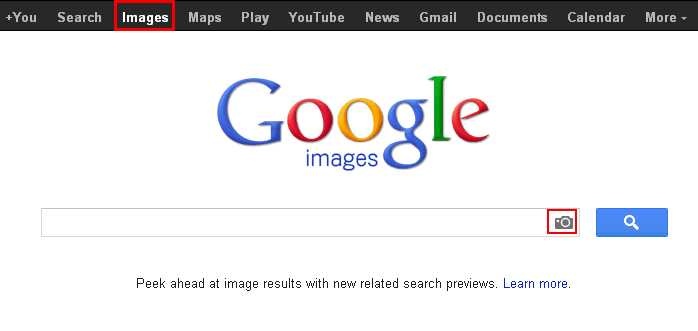
Some times you do not remember people name but you do have their image. By doing reverse image search you can find similar images and associated information with these images over internet.
16 September, 2012
How to become a google verified author in 5 steps
Print PDF

Whenever you search a topic in Google you always see an author image in left side of SERPs. These author are Google verified author. You can also be a Google verified author. There are lots of benefits associated if you are Google verified author.
Benefits of Google Verified Author:
1. More Visibility of your blog in Search Engine Result Pages.
2. Provides credibility to the Author of the post.
3. Your articles get a unique outlook which attracts users to select your website only.
4. Many Internet Webmasters believes that their blog traffic has been drastically increased after Google Verification process.
5. Gives a personal edge too.
6. It increases your reliability and people are able to recognize you as a branded company.
1. More Visibility of your blog in Search Engine Result Pages.
2. Provides credibility to the Author of the post.
3. Your articles get a unique outlook which attracts users to select your website only.
4. Many Internet Webmasters believes that their blog traffic has been drastically increased after Google Verification process.
5. Gives a personal edge too.
6. It increases your reliability and people are able to recognize you as a branded company.
Here are the steps to become a Google verified author.
Step #1: If you don't have Google+ profile then make a "Google+ profile".
Step#2: Now if you don't have about author page then make a "ABOUT AUTHOR" page on your blog or website.
Step#3: Now anywhere in "ABOUT AUTHOR" page place this link
<a href=”https://plus.google.com/113073129986384123692″ rel=”me”>Join me on Google+</a>
- Change profile link in blue colour with your Google + profile link.
- You can also change "Join me on Google +" text with your desired word.
- Please do not remove rel="me" tag.
Step#4: Now place this following link in header or footer of your blog or website.
<a rel=”author” href=”http://Digitzz.blogspot.com/p/about.html”>About</a>
- Change author page link in blue colour with your Author page link.
- Please do not remove rel="author" tag.
Step#5: Now go to your Google+ profile and click on edit profile. Add a link back to your author page in the “Contributor to” section of your links.
Add a new custom link with a label and URL of your blog/website author page and save it.

Confirm your verification and Picture in Search Engine?
To check your markups and tags properly inserted or not, go to Rich Snippets Testing tool to insure your markup is implemented correctly simply by entering a link to any of your posts in the testing tool. If everything will be OK then your image will be shown.

How much time did Google takes to show your Picture in SERP’s:
Well! It depends on your blog PageRank. If your blog/site have Google PageRank more than 1 then it almost takes 2-3 days.
Well! It depends on your blog PageRank. If your blog/site have Google PageRank more than 1 then it almost takes 2-3 days.
For blogs having Page Rank 1 or 0 should Ping Google servers to notify this change via this url-
DONE !
11 August, 2012
Free website submission to Google, Bing and other search engines
Print PDF
How to add URL to Google, MSN and Other search engines
Ok ! You have your website and now you want your website to be included in the search engines and crawlers list.
Its not as easy to get your website name in the first page of search result page. you have to do many things.
Either you go for paid advertising or free. i think free is better.
There are lots of free websites which provide free facility to include your website details in their search result.
Some of them listed below.
1. Google https://www.google.com/webmasters/tools/submit-url
2. Microsoft(Bing) http://www.bing.com/webmaster/SubmitSitePage.aspx
3. Addme http://www.addme.com/
4. Web Launch http://www.nexcomp.com/weblaunch/submiturlfree.html
5. Submitt Express http://www.submitexpress.com/free-submission.html
6. Free web submission http://freewebsubmission.com/
Ok ! You have your website and now you want your website to be included in the search engines and crawlers list.
Its not as easy to get your website name in the first page of search result page. you have to do many things.
Either you go for paid advertising or free. i think free is better.
There are lots of free websites which provide free facility to include your website details in their search result.
Some of them listed below.
1. Google https://www.google.com/webmasters/tools/submit-url
2. Microsoft(Bing) http://www.bing.com/webmaster/SubmitSitePage.aspx
3. Addme http://www.addme.com/
4. Web Launch http://www.nexcomp.com/weblaunch/submiturlfree.html
5. Submitt Express http://www.submitexpress.com/free-submission.html
6. Free web submission http://freewebsubmission.com/
Make online money from Facebook and Twitter account
Print PDF
Earn Money from Facebook and Twitter account
"Make Money Online With Facebook" sounds funny but its true. Now you can make some money from your twitter and Facebook account.
When i was searching some ideas for online money making, i gone through FanSlave. With the help of this site Facebook users can make out some money from their own Facebook Account. you need to just click on "Like" button of Fanslave's created pages on Facebook and they will credit your account with points (cash is the half of your credits points) for that, Isn't it nice?
Just follow the steps Given Below :
Note : It will take much time to earn money by just liking the fan pages, You need to refer friends with your own special referral link given and you can see the flow of money in your account. But you need to refer real and long lasting friends, and don't try to cheat them.
So Sign up NOW...
"Make Money Online With Facebook" sounds funny but its true. Now you can make some money from your twitter and Facebook account.
When i was searching some ideas for online money making, i gone through FanSlave. With the help of this site Facebook users can make out some money from their own Facebook Account. you need to just click on "Like" button of Fanslave's created pages on Facebook and they will credit your account with points (cash is the half of your credits points) for that, Isn't it nice?
Just follow the steps Given Below :
- Register at FanSlave and connect your Facebook and Twitter Account with it.
- You will see list of pages with amount of credit points, Start to "Like" the fanpages and follow on Twitter.
- You will get credits accordingly (cash is the half of your credits)
- When you will 15.00 EUR, you can apply for payment via paypal or alertpay.
Note : It will take much time to earn money by just liking the fan pages, You need to refer friends with your own special referral link given and you can see the flow of money in your account. But you need to refer real and long lasting friends, and don't try to cheat them.
So Sign up NOW...
10 August, 2012
Translate anything with Google text-to-speech service
Print PDF

Example: copy the URL
http://translate.google.com/translate_tts?q=I+love+digitzz
Just change I Love Digitzz with your word.
Subscribe to:
Posts (Atom)
